MULTI RISK MANAGER PRO

Multi Risk Manager Pro MT5 Risk Calculator

Multi Risk Manager Pro combines an MT5 risk calculator, forex position sizing, visual risk-to-reward planning, prop firm limits and trade copying in one trading panel.

REAL PRODUCT INTERFACEMETATRADER 5
Position sizing · On-chart planningCLICK IMAGE TO ENLARGE ↗
MT5 RISK CALCULATOR · TRADE MANAGEMENT EA

What Is Multi Risk Manager Pro?

An MT5 risk calculator and trading workflow built around position sizing, protection and control.

Multi Risk Manager Pro is an MT5 risk calculator, forex position size calculator and chart-based trade management Expert Advisor for MetaTrader 5. It helps traders calculate lot size using defined risk rules, plan entries and exits with a visual risk-to-reward box, and execute market or pending orders from one professional trading panel.

Beyond trade execution, it brings breakeven, trailing stops, partial closes, profit locking, account protection, prop firm risk controls, economic news, trading history and trade copying into one integrated interface.

  • 8 Forex Position Sizing MethodsPlan risk before execution
  • Advanced Trade ManagementBreakeven, trailing & partial exits
  • Prop Firm Controls & Trade CopyingManage account limits and connected MT5 workflows
SIX CORE MODULES · SEVEN REAL WORKFLOWS

One Trading Panel. Everything You Need.

Calculate and control risk, execute orders, manage open trades, analyze results, follow economic events and copy trades between MetaTrader 5 accounts. Explore each module below.

NEW · COMPLETE BUTTON & SETTINGS REFERENCEExplore all 104 MT5 controls, explained step by step
01 / STANDARD TRADING + PROP FIRM

Position sizing, R:R, multi-level TP/SL, market and pending orders.

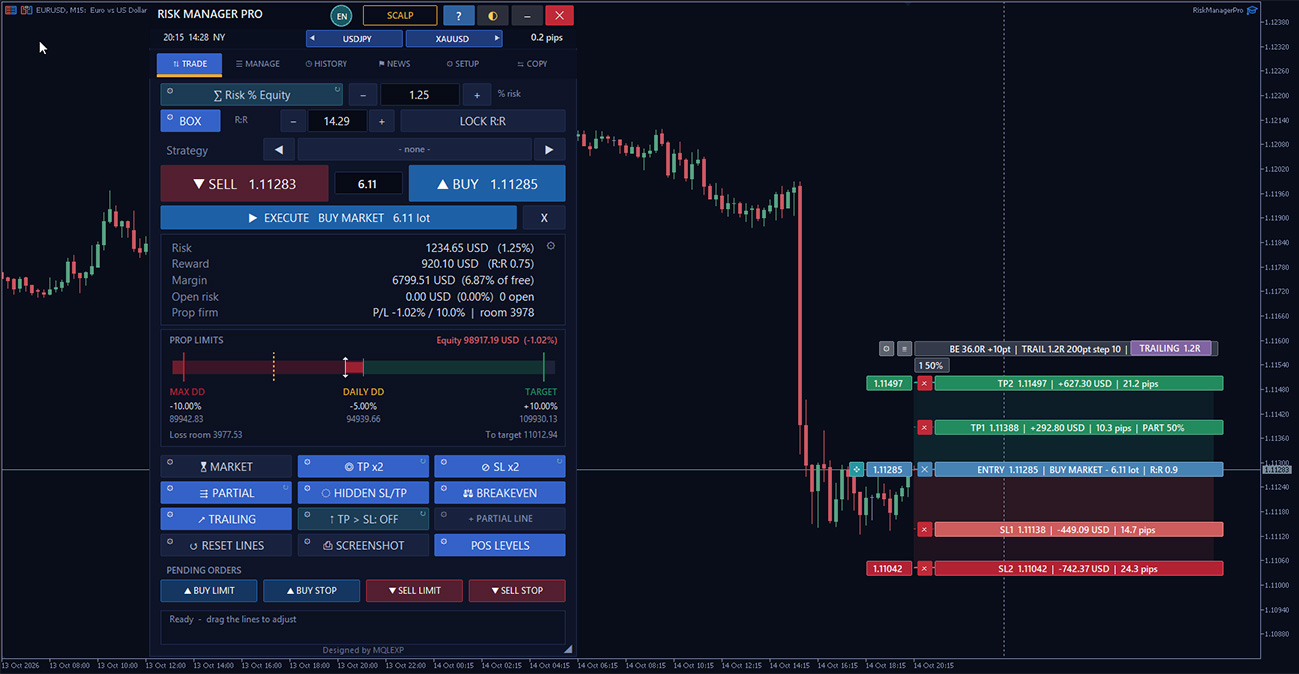
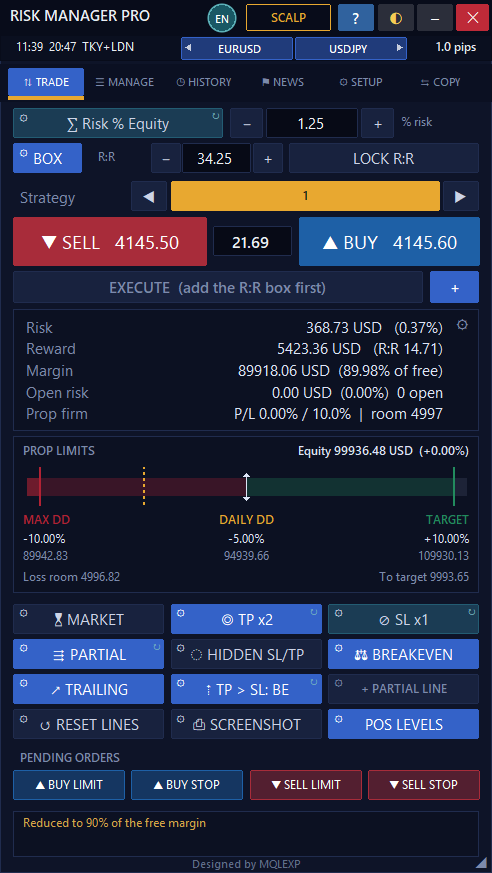
TRADE — Standard · MT5 Panel

Up to 5 TP levelsUp to 3 SL levels
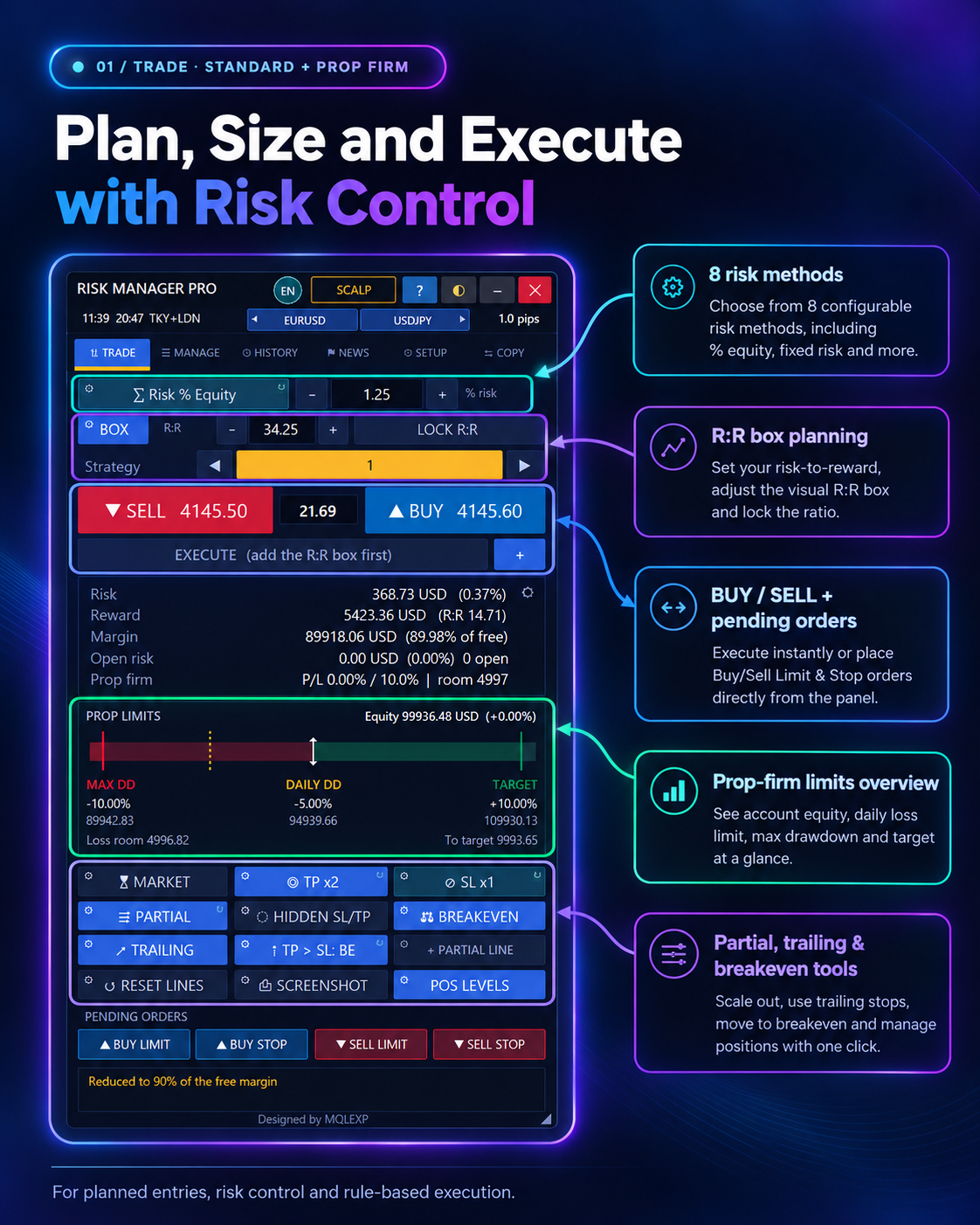
01 / TRADE · STANDARD + PROP FIRM

Professional MT5 Risk Calculator, Prop Firm Controls & Precision Trade Execution

Plan your risk before every trade.

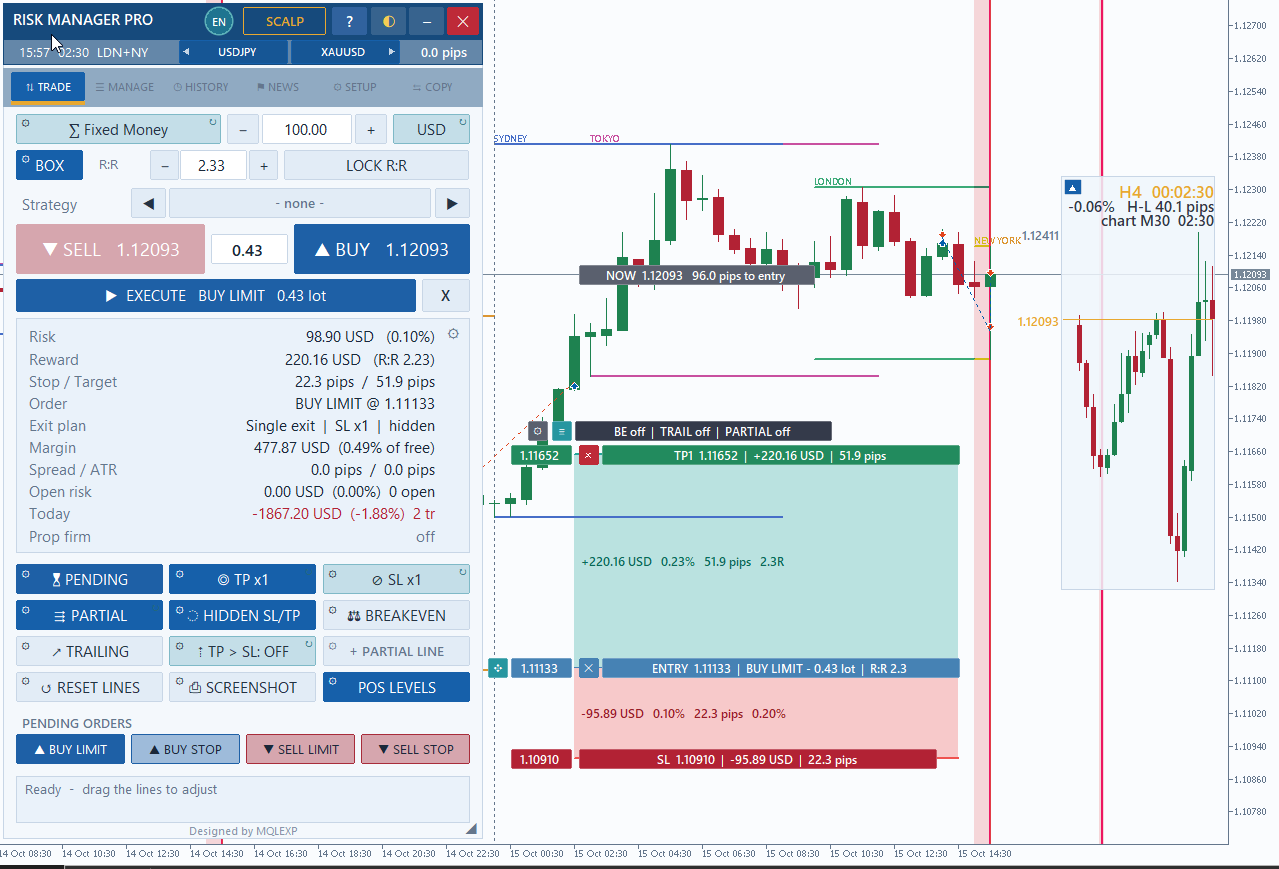
Calculate lot size using configurable risk methods, adjust a visual risk-to-reward box, review projected margin and place market or pending orders directly from the MT5 chart. The TRADE panel keeps risk, reward and prop-firm limits in view while planning an entry.

  • Position sizing and risk-per-trade inputs
  • Visual R:R, SL and TP controls
  • Market, limit and stop order entry
  • Risk, reward and margin preview
  • Prop-firm drawdown overview
  • Partial exit and position tools
Try Free Online Demo ↗

Plan multi-level exits before you trade

Configure up to five take-profit levels and three stop-loss levels. Choose split orders or partial-close exit handling, and base TP distances on risk-to-reward or a percentage of price.

01B / TRADE · SCALP MODE

Fast execution, configurable profiles and optional entry safeguards.

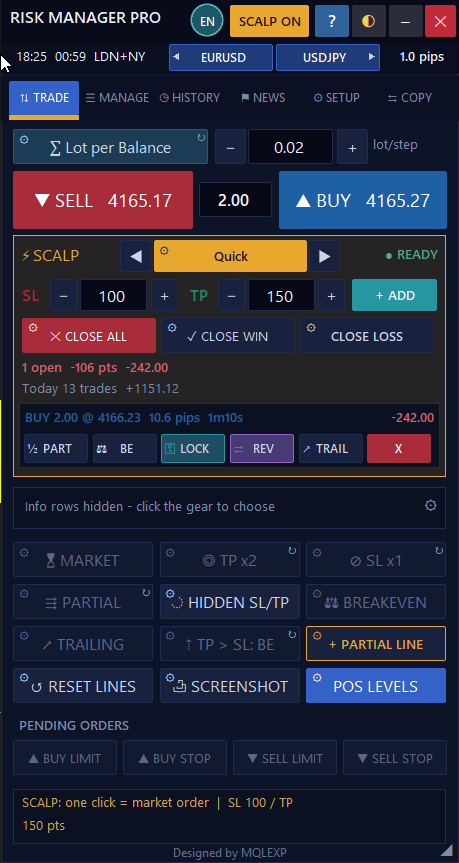
TRADE — Scalp Mode · MT5 Panel

Optional scalp cooldownDaily scalp limits
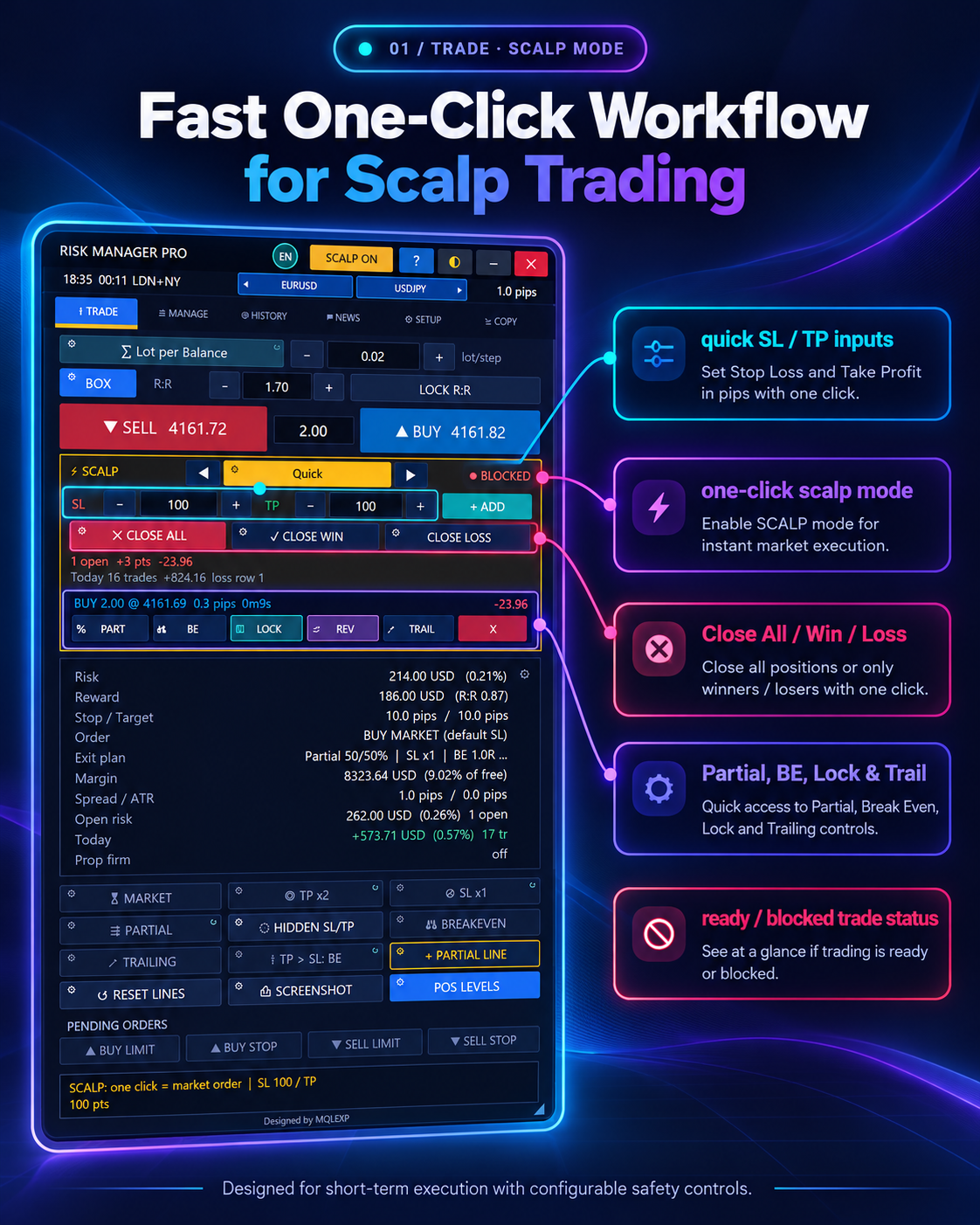
01 / TRADE · SCALP MODE

Fast Execution With Scalp Mode

Quick controls for short-term trading workflows.

Switch into the integrated SCALP layout to use the selected scalp profile, quick SL/TP inputs, trade status and one-click management buttons. Visible controls include Close All, Close Win, Close Loss, Partial, Breakeven, Lock and Trail.

  • Scalp profile selector and activation
  • Quick Stop Loss / Take Profit inputs
  • Close All / Win / Loss actions
  • Partial, BE, Lock and Trail controls
  • Open position and result overview
  • Visible blocked-trade status

Control the pace of scalp trading

Optional controls include a maximum spread, trade cooldown, cap on open scalp trades, stop-after-losses rule and daily scalp profit or loss limits. Automated BE, trailing and partial-close options can also be configured.

02 / MANAGE

Partial closes, Secure, Lock Profit and position-level controls.

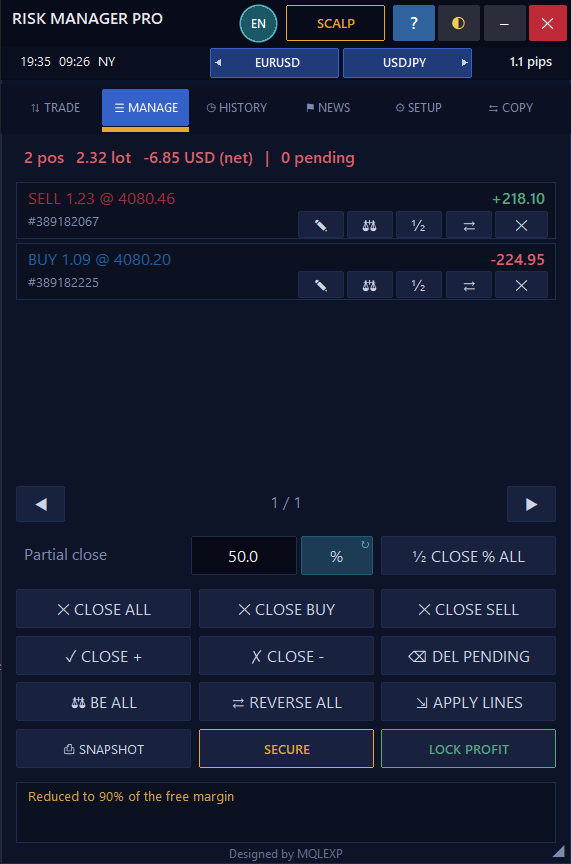
MANAGE · MT5 Panel

Profit lock: %, points or RSecure and Apply Lines
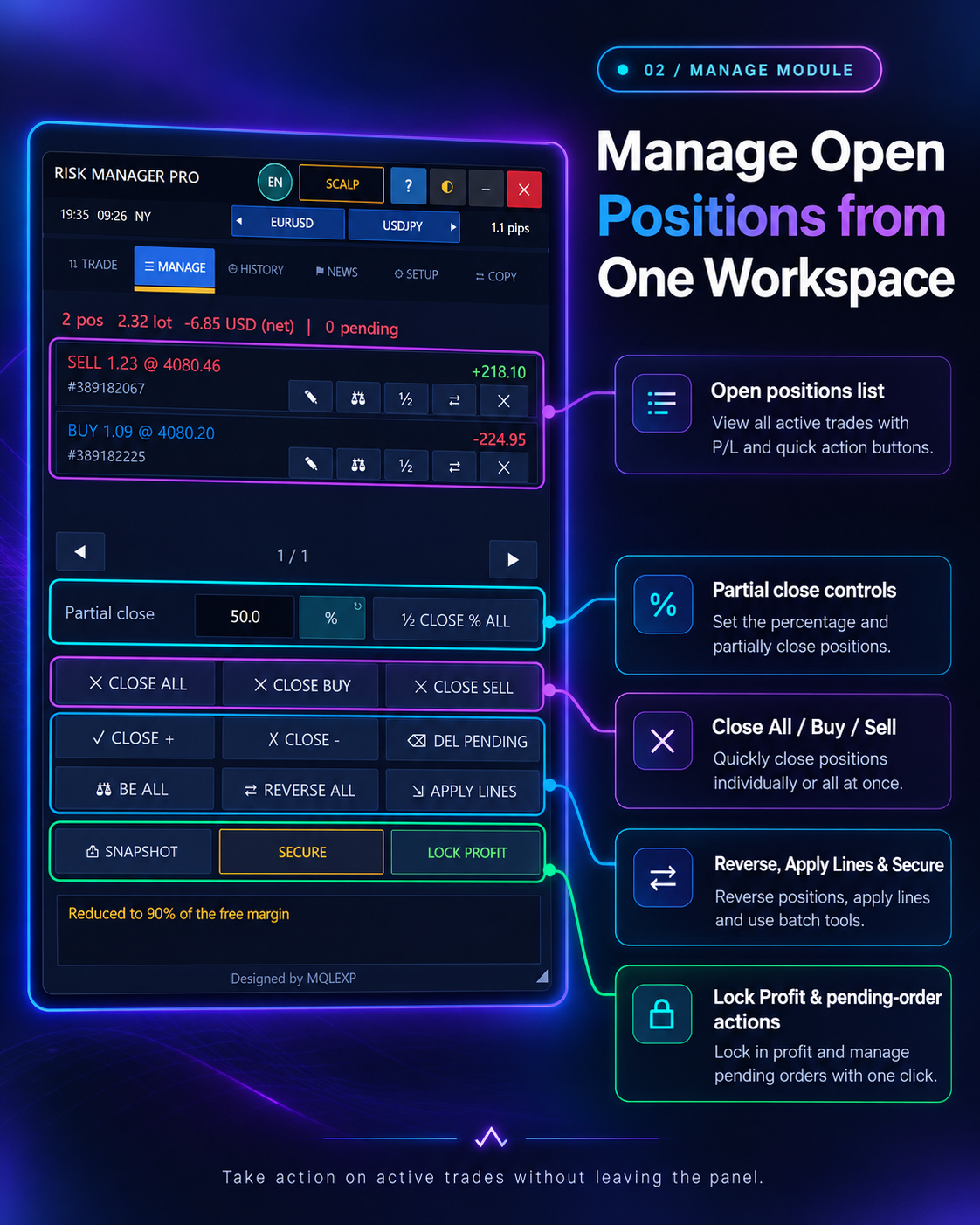
02 / MANAGE MODULE

Advanced Position Management

Act on open positions from a single workspace.

Inspect open positions and pending orders, apply selected actions across positions and manage partial exits. The MANAGE panel includes Close All, Close Buy, Close Sell, Reverse All, Apply Lines, Secure, Lock Profit and Breakeven controls.

  • Close All / Buy / Sell controls
  • Partial close by selected percentage
  • Breakeven for open positions
  • Reverse and position action tools
  • Secure / Lock Profit commands
  • Pending-order cancellation

Protect profit with your own rules

Set profit-locking by a percentage of open profit, fixed points or an R multiple. Use partial-close lines, the Secure action and position-level SL/TP tools to manage eligible trades.

03 / HISTORY

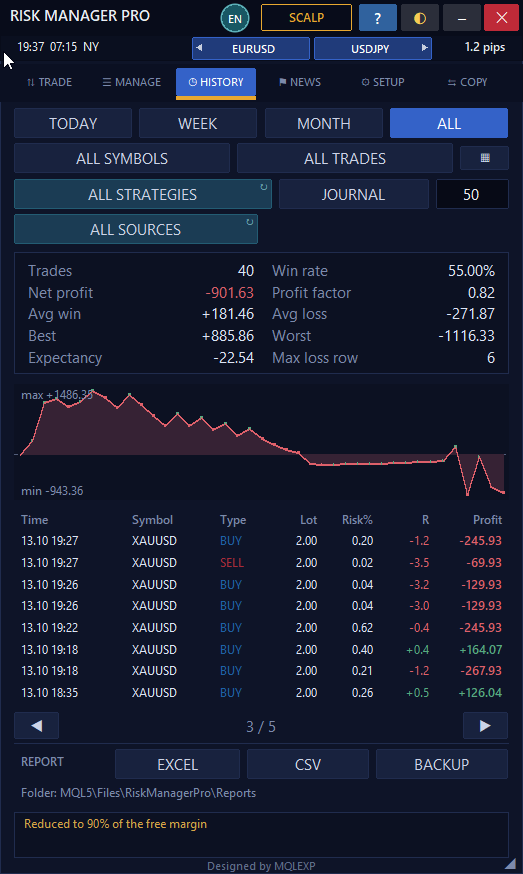
Performance, closed-deal statistics, filters and report exports.

HISTORY · MT5 Panel

Performance metricsExcel and CSV reports
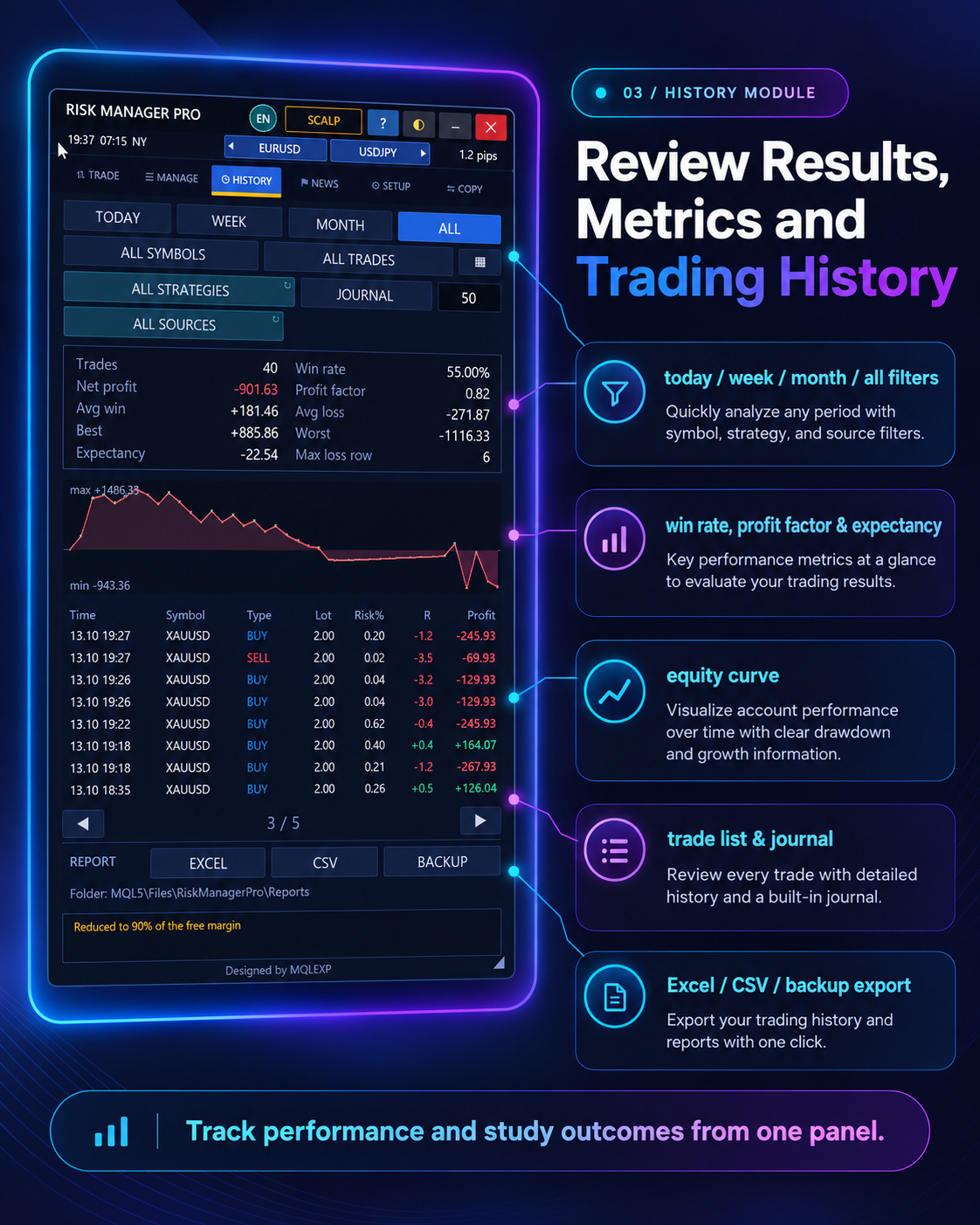
03 / HISTORY MODULE

Trading History & Performance Analytics

Understand the results behind your trading decisions.

Review recorded trades using time-period, symbol, source and strategy filters. Explore the performance curve and metrics such as net profit, win rate, profit factor and expectancy, and export history for external review.

  • Today, week, month and all-time filters
  • Win rate, profit factor and expectancy
  • Net profit, best and worst trade
  • Equity / performance curve
  • Trading journal and strategy filters
  • Excel, CSV and backup options
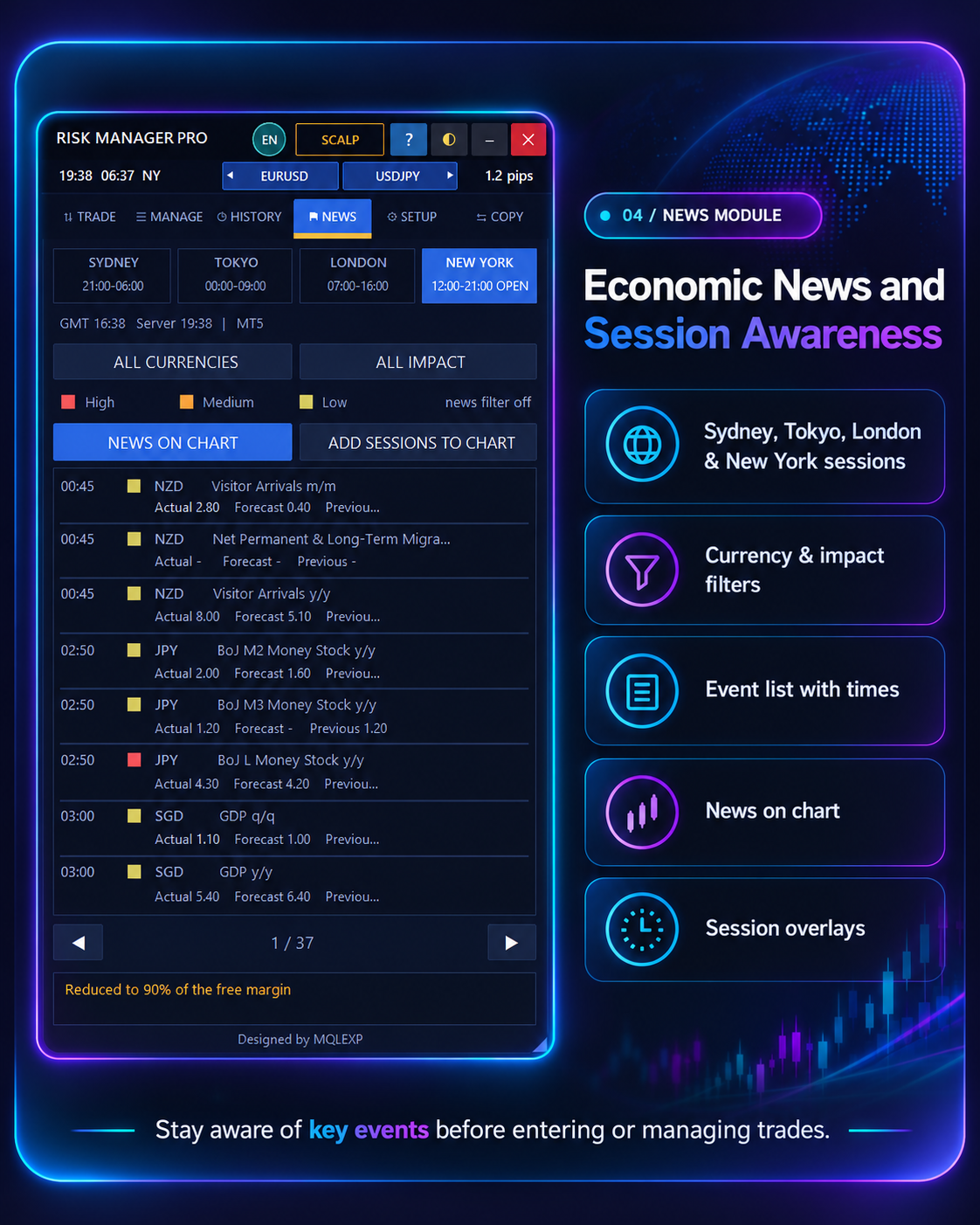
04 / NEWS

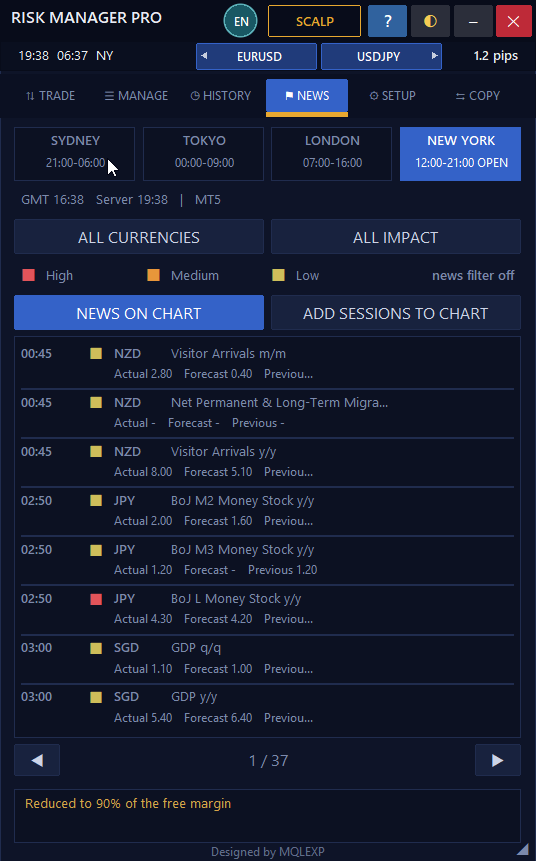
Calendar, market sessions, alerts and optional event restrictions.

NEWS · MT5 Panel

Impact and currency filtersCustom news time windows
04 / NEWS MODULE

Economic News & Market Sessions

Keep relevant market events in one place.

Access the economic-event list alongside major trading sessions. Filter events by currency and impact level, follow upcoming announcements, and display news markers or session information directly on the MetaTrader chart.

  • Sydney, Tokyo, London and New York
  • Currency and impact-level filters
  • Event time and calendar details
  • High / medium / low impact markers
  • News on Chart option
  • Session overlays on chart

Define your economic-news window

Optional news filters use a configurable time window before and after events, selected impact levels and relevant currencies. You can also show calendar events and trading sessions on the chart.

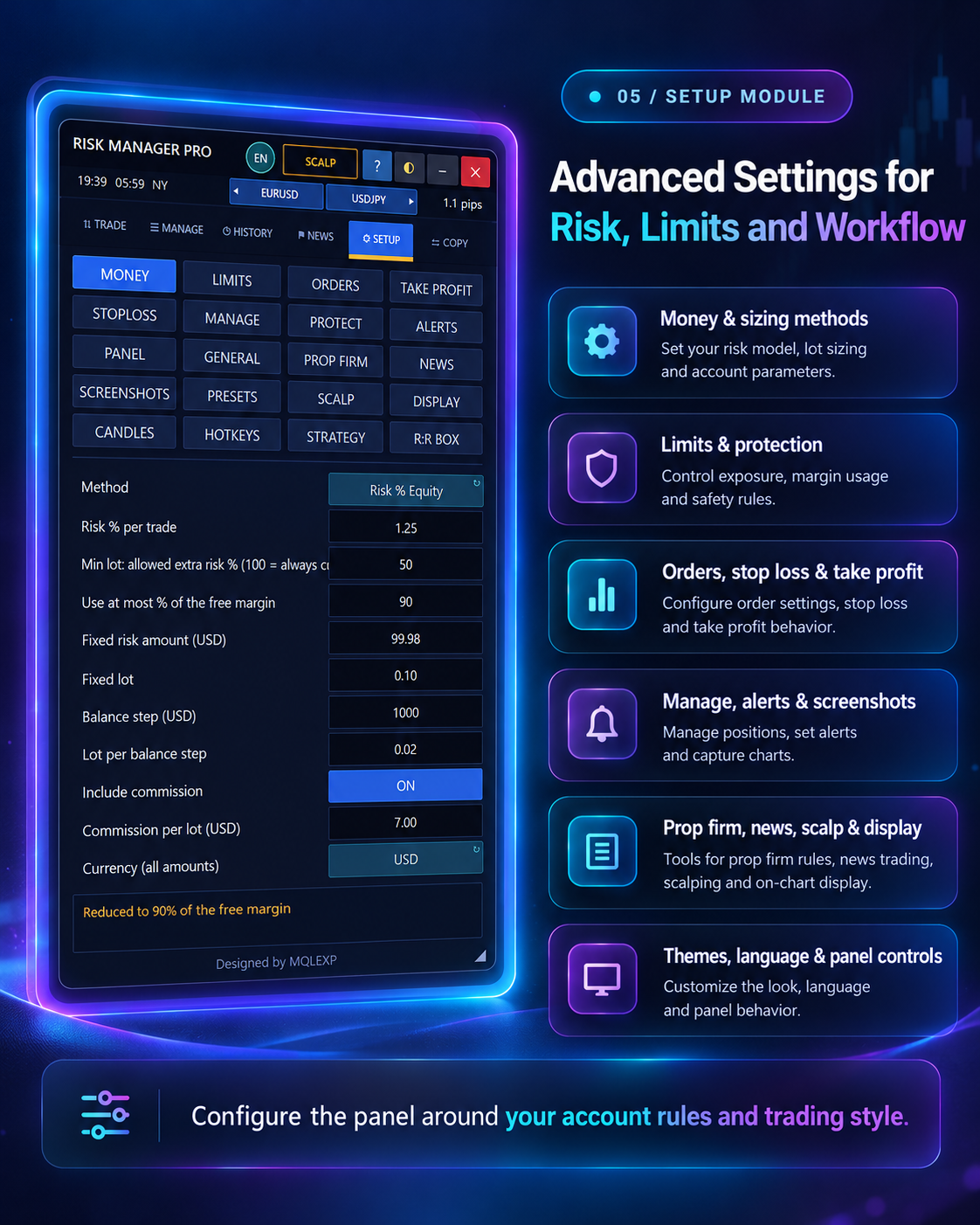
05 / SETUP

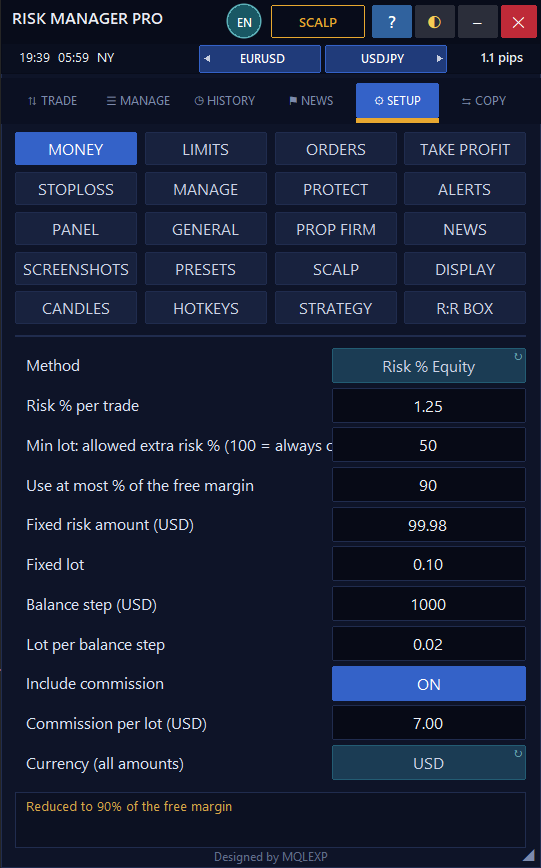
Risk models, prop firm controls, languages, screenshots and hotkeys.

SETUP · MT5 Panel

20 themes / 16 languagesHotkeys and screenshots
05 / SETUP MODULE

Advanced Risk Settings & Panel Customization

Configure the platform for your strategy and account rules.

Fine-tune position sizing and the panel's execution and protection workflow. SETUP includes dedicated groups for Money, Limits, Orders, Take Profit, Stoploss, Manage, Protect, Alerts, Panel, General, Prop Firm, News, Screenshots, Presets, Scalp, Display, Candles, Hotkeys, Strategy and R:R Box.

  • Money methods and risk percentage
  • Account, daily-loss and prop-firm limits
  • Order, SL and TP configuration
  • Manage, Protect and Alerts settings
  • Scalp profiles, hotkeys and presets
  • Appearance, candles and R:R box

Tailor the platform to your workflow

Choose from 20 interface themes and 16 languages, adjust the panel size, configure hotkeys and optional automatic chart screenshots, and customize money management and execution safeguards.

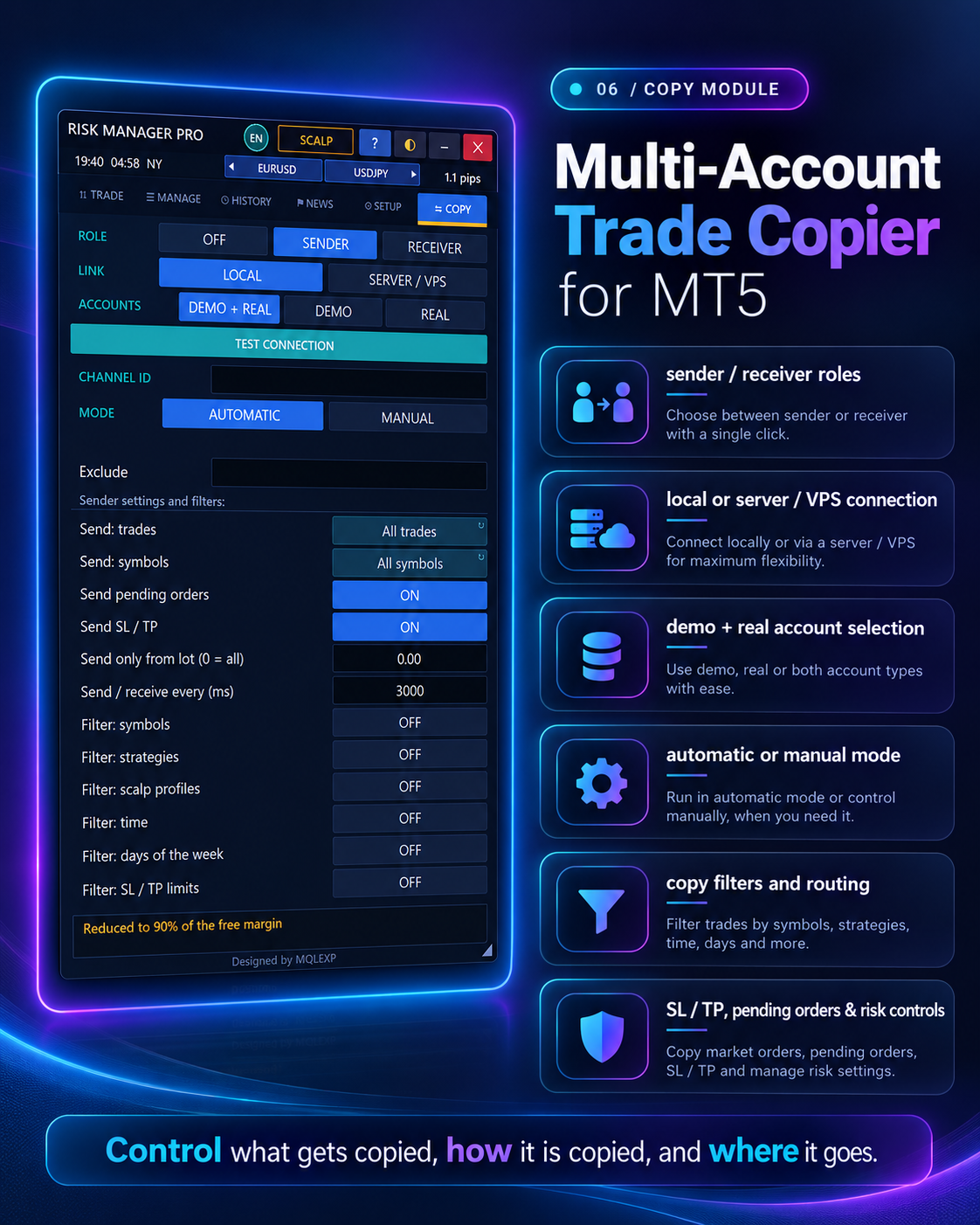
06 / COPY

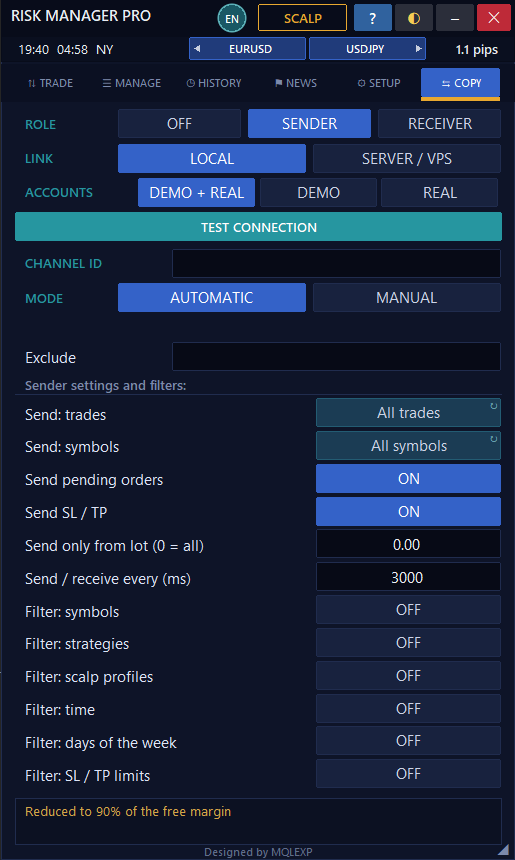
Sender and receiver workflows with flexible volume and filters.

COPY · MT5 Panel

5 receiver sizing methodsReverse and route filters
06 / COPY MODULE

MT5 Multi-Account Trade Copier

Configure sender and receiver connections.

Copy trading activity between configured MetaTrader terminals using sender/receiver roles. Choose local or Server/VPS connection, select demo/real account participation, set automatic or manual mode, and customize which trades and symbols can be copied.

  • Sender / Receiver operating modes
  • Local and Server / VPS connection
  • Demo and real account options
  • Automatic and manual copy mode
  • Pending order and SL / TP switches
  • Filters for symbols, strategy and time

Five ways to size copied positions

Receiver sizing can follow the sender volume, use a multiplier, scale by account-balance ratio, use a fixed lot or calculate a risk percentage. Reverse-copy, pending-order, SL/TP and timing filters are configurable. The copier's ‘Respect my limits’ option does not currently check news restrictions.

REAL MT5 PRODUCT SCREENSHOTS

See the Features Working on the Chart.

Beyond the panel: explore what the risk-to-reward controls, chart tools, economic news filters and trade copier actually look like inside MetaTrader 5. All screenshots are from the product interface, with no visual retouching.

01 / VERIFIED INTERFACE

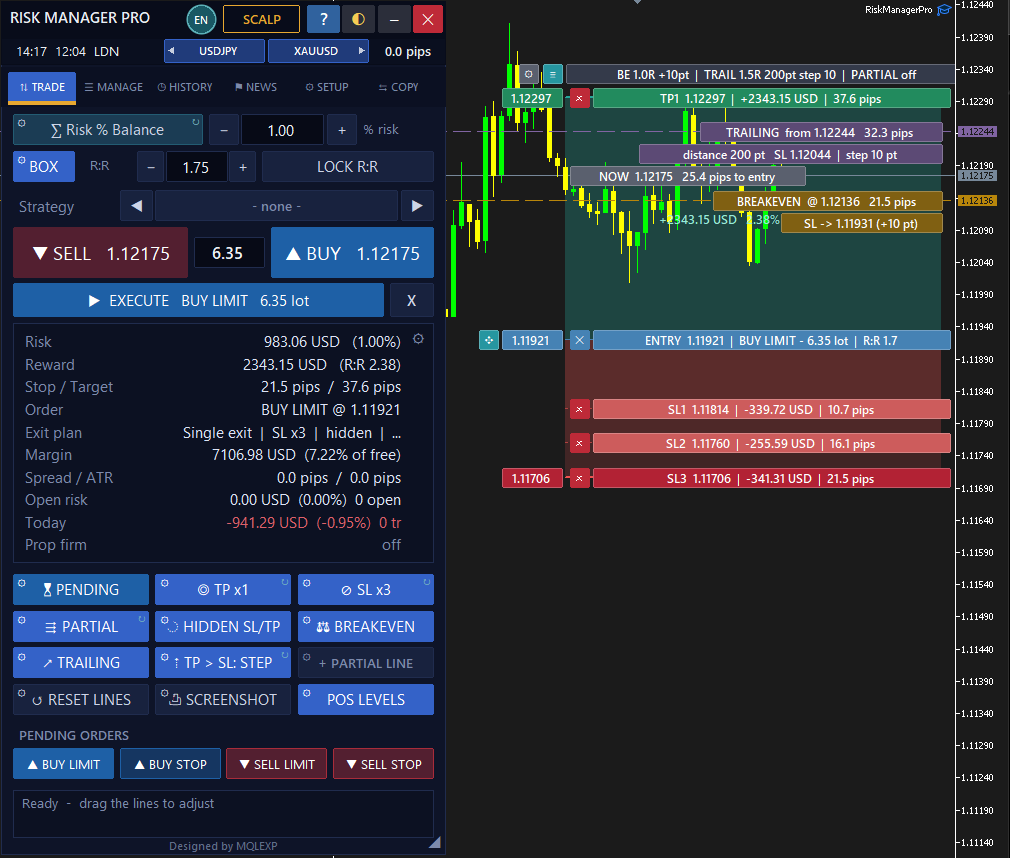
Trade Planning, R:R Box & Chart Execution

See how a trade moves from a risk calculation to visual entry and exit planning. These are unmodified screenshots of Multi Risk Manager Pro running on MetaTrader 5.

TRADE · BOX

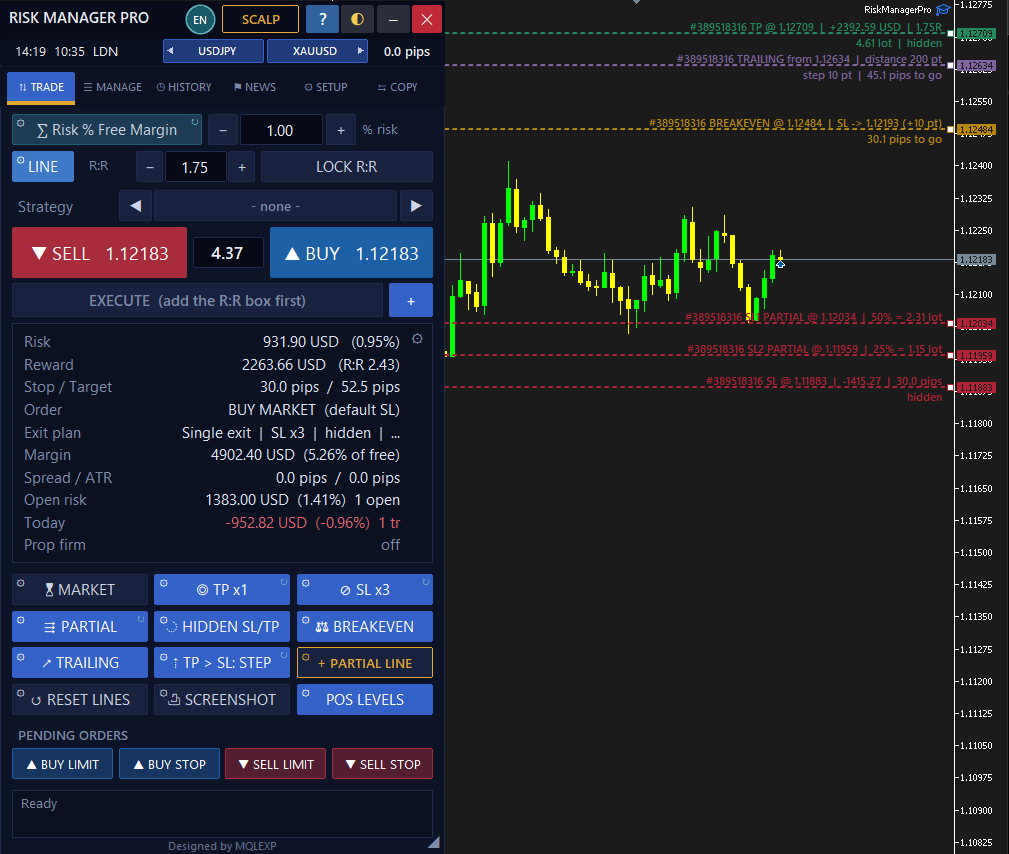
MT5 Risk-to-Reward Box

Visualize entry, stop loss and take-profit areas, projected risk/reward and management lines on the chart.

TRADE · LINE

LINE Mode & Hidden Stops

Inspect separate trade-planning lines and the plotted multi-level SL, break-even and trailing management.

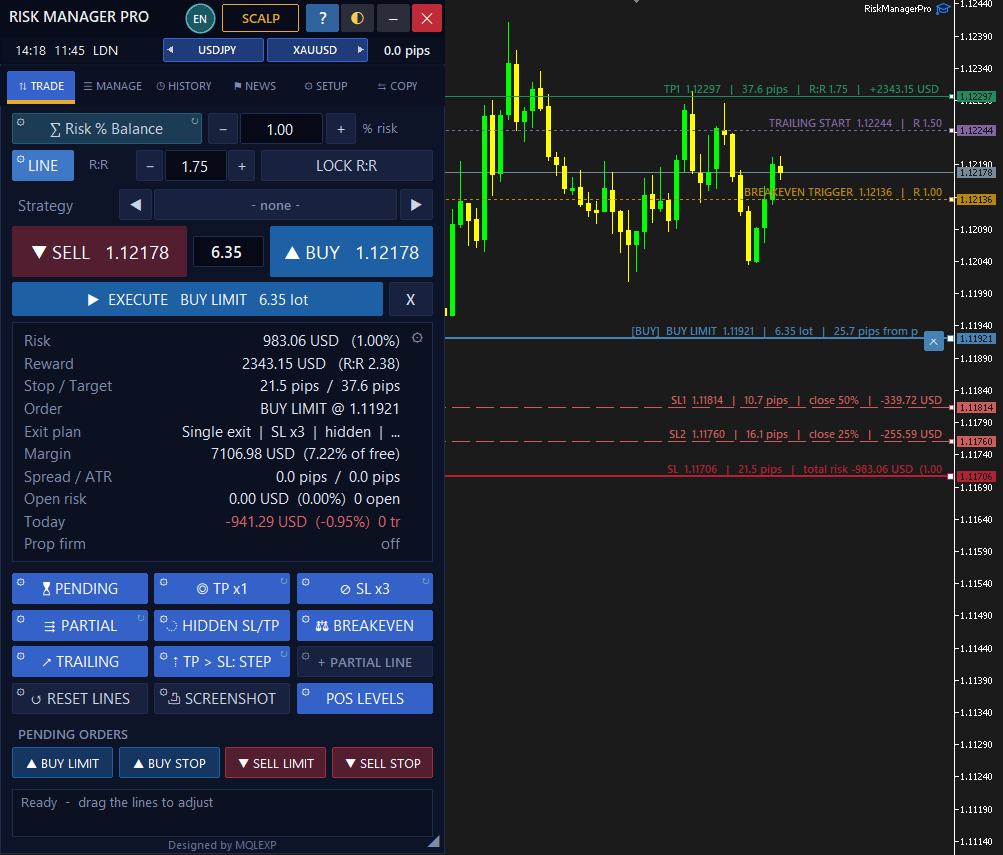
TRADE · PENDING

Pending Order Planning

See Buy Limit entry levels and the stop and target lines used for pending-order planning.

02 / VERIFIED INTERFACE

Advanced Setup & On-Chart Features

Understand the connection between a setting and the resulting chart experience: side candles, economic-news controls and automated screenshot capture.

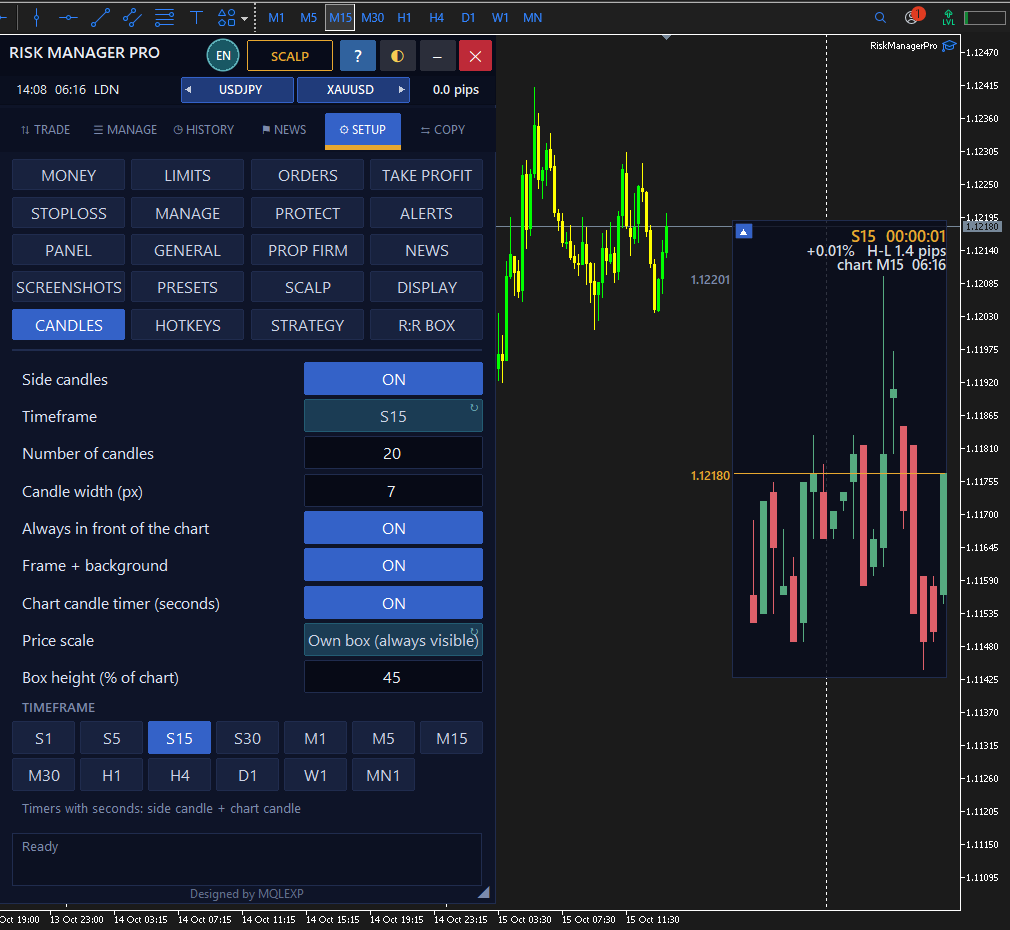
SETUP · CANDLES

Side Candles on the Chart

Choose a secondary timeframe in SETUP > CANDLES and display its compact candle panel on the live chart.

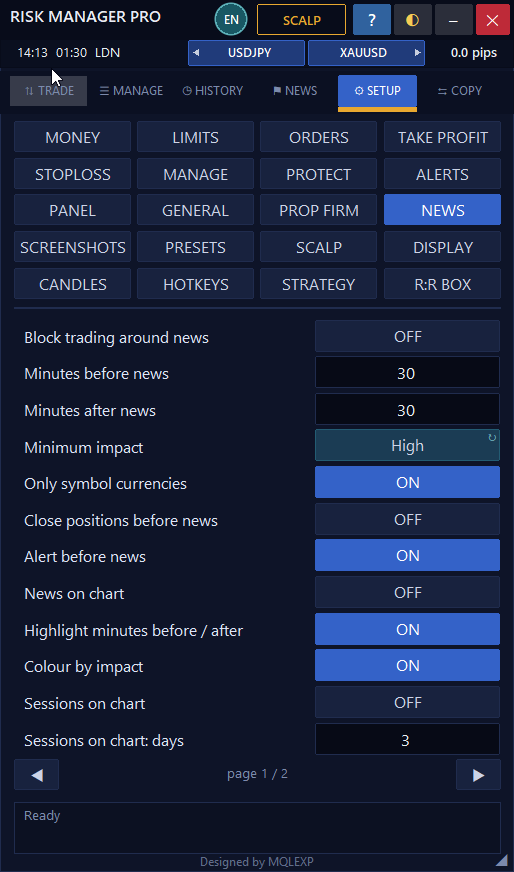
SETUP · NEWS

News Timing & Trading Filters

Configure before/after-news minutes, currency and impact filters, alerts and news-related trade restrictions.

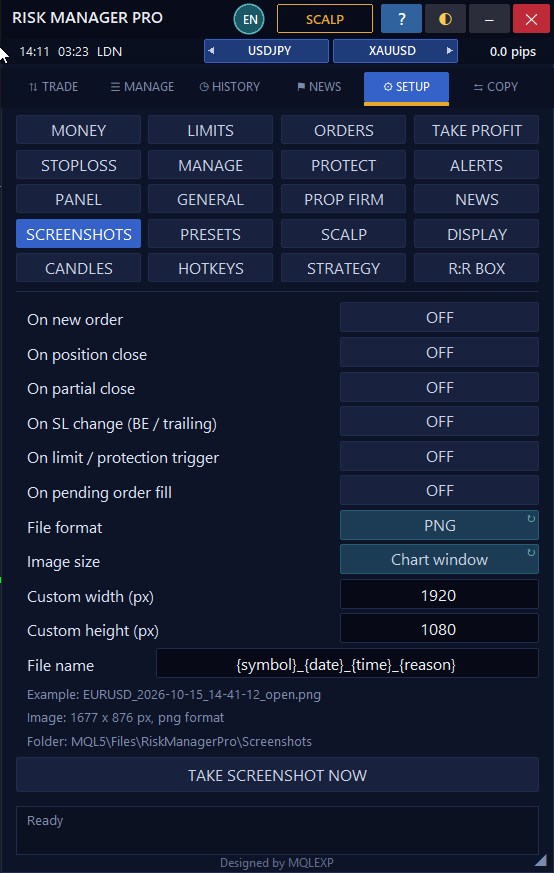
SETUP · SCREENSHOTS

Automatic Screenshot Triggers

Save screenshots on new orders, closes, partial closes, stop changes or chosen protection events.

03 / VERIFIED INTERFACE

Trade Copier: Sender & Receiver

Two different roles, two different configuration panels. Inspect the real sender and receiver screens without confusing their options.

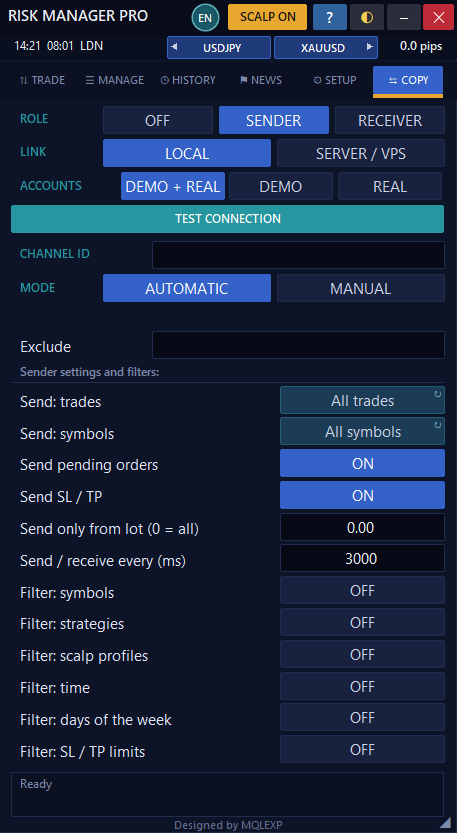
COPY · SENDER

Trade Copier — Sender

See which positions, pending orders and stop/target updates the Sender can transmit and filter.

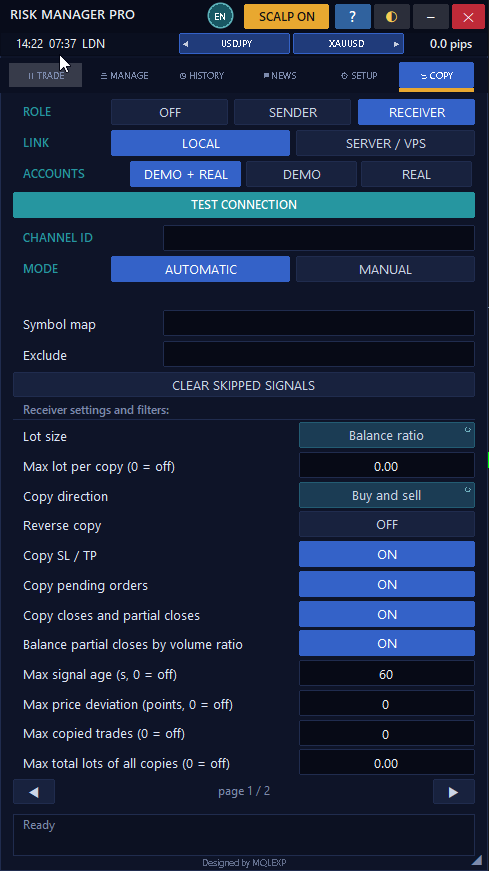
COPY · RECEIVER

Trade Copier — Receiver

Review receiving volume methods, signal age, price deviation and copy limits.

04 / VERIFIED INTERFACE

Guidance & Personalized Appearance

Built-in help and interface customization can make a sophisticated trading workflow easier to learn and use.

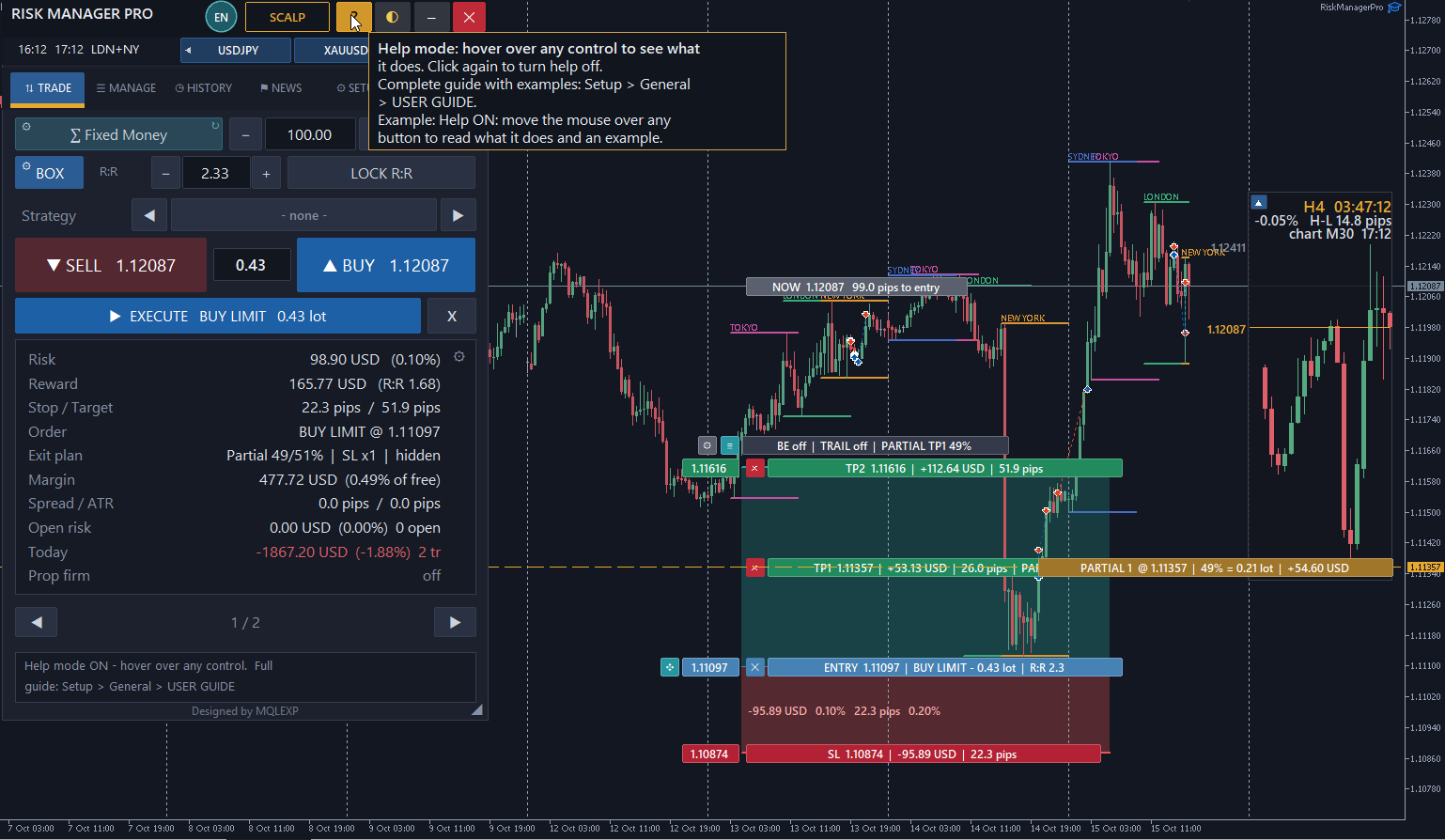
HELP MODE

Built-In Interactive Help

Activate Help Mode and hover over panel controls to read explanations and usage hints in the software.

INTERFACE · THEME

Day Theme & Visual Planning

Compare the real light-color interface with the dark workspace while using the same visual R:R box.

Real product views, not concept mockups. Individual functions depend on the selected settings, account/broker restrictions and the MetaTrader terminal. News filters highlight configured event windows; they do not predict whether a market move will be profitable or dangerous.
INTERACTIVE PRODUCT REFERENCE 104 MT5 Controls. Every Feature Explained. Discover what the buttons actually do — from planning a trade to advanced risk protection, chart tools and trade copying. 104 explained controls7 module workflowsStep-by-step explanations R:R BOX & TP x5Plan visual entries and staged exits BREAKEVEN & SECURESee how risk and profit are managed COPY SENDER / RECEIVERExplore trade copying and lot sizing
MT5 CONTROL & SETTINGS EXPLAINED

Detailed Risk Manager Pro Guide

Explore the main controls in every module. Open a topic to see what that option does, when it is useful and which limitations matter. Written in plain English from the product's settings registry and technical documentation.

01 / MODULE GUIDE

TRADE — Standard + Prop Firm

Plan position size, market and pending entries, visual targets and broker-aware order execution.

?Method / Lot Size

Pick from eight sizing methods. The EA recomputes size from account values, stop distance and broker volume restrictions.

?Risk % / Money

Set a risk percent or money amount in the risk currency. The executed loss can differ due to spread and slippage.

?R:R BOX / LINE

Show entry, stop and profit zones as a box or drag separate lines to update the trading plan.

?LOCK R:R

Keep target ratios consistent when your planned entry or stop changes; without the lock, price targets remain fixed.

?Strategy

Tag eligible standard trades with a strategy name so results can later be filtered in History.

?BUY / SELL

Choose or send market orders according to whether the visual box and EXECUTE workflow is active.

?EXECUTE

Confirm and submit the prepared side, order type, lot, entry, SL and TPs when the visual trade plan is active.

?MARKET / PENDING

Switch the trade setup between current-price execution and a pending entry.

?BUY LIMIT / SELL LIMIT

Prepare a price-improving pending entry. The broker must support the requested order.

?BUY STOP / SELL STOP

Prepare a breakout pending entry; optional stop-limit requests depend on broker support.

?Risk / Reward / Margin

See estimated risk, reward, available margin and open exposure as the plan changes.

?TP x1–x5

Choose up to five profit levels with R:R- or percentage-based targets and configured close-volume shares.

?SL x1–x3

Choose up to three loss levels; earlier stops are EA-managed partial exits while the final visible stop is broker-held.

?EXIT / Partial vs Split

Use a partially closed position or split orders with their own TPs. Netting accounts can alter split handling.

?TP > SL: BE

Choose whether remaining stops move to breakeven or the previous TP after a target fills.

?BREAKEVEN

Automatically move the stop to entry plus an offset after an eligible R-based trigger.

?TRAILING

Track price using a points-, ATR- or candle-based stop with a start threshold and step.

?HIDDEN SL / TP

Virtual levels are managed by the EA, not stored as broker stops. Keep the terminal online and receiving ticks.

?+ PARTIAL LINE

Add a draggable on-chart partial-close trigger that applies to matching positions when crossed.

?RESET LINES / POS LEVELS

Reset the planned levels or show and drag eligible per-position stop/target and management levels.

02 / MODULE GUIDE

SCALP — One-click execution

Fast order entry with configurable protective thresholds; it does not create trading signals.

?SCALP ON / OFF

Switch BUY/SELL to direct scalp market-order mode; standard EXECUTE and confirmation are bypassed.

?Profile Quick / Runner / Tight / Swing

Apply stored scalp settings. Automatic per-trade actions still need explicit activation.

?SL − / +

Adjust the scalp stop distance in symbol points, not universally equivalent pips.

?TP − / +

Adjust the scalp target in points; a zero TP disables that target setting.

?+ ADD

Show the scalp R:R box anchored to market price, not a pending order.

?CLOSE ALL / WIN / LOSS

Close eligible scalp positions, optionally only winning or losing positions, without a second confirmation.

?READY / BLOCKED

Show whether new scalp orders may be sent and the current block reason.

?PART

Switch a scalp position's automatic partial-close action on or off after a trigger is configured.

?BE

Switch per-position automatic breakeven on or off using a configured points trigger.

?TRAIL

Switch per-position trailing using scalp-specific start, distance and step settings.

?LOCK

Attempt to lock a configurable portion of profit on eligible winning positions.

?REV / X

Reverse by closing and reopening a position, or close the position directly; a reopen can fail.

?Max spread / Trades / Cooldown

Optionally block new scalp entries when spread, position count or cooldown rules apply.

?Loss streak / Daily scalp limits

Optionally stop accepting new scalp orders after configured losing streak or realized daily limits; open trades are not closed by these blocks.

03 / MODULE GUIDE

MANAGE — Open positions

Manual trade handling, bulk controls and chart-based protection for eligible open positions.

?Open position list / ED

Review individual positions or pending orders; edit available stop, target, strategy, lot or other supported fields.

?BE / BE ALL

Move one or all eligible stops to entry plus the BE offset; check this will not loosen a better existing stop.

?% / CLOSE % ALL

Partially close selected positions by a percent, lot or money amount; broker volume rules apply.

?CLOSE ALL / BUY / SELL

Close all eligible positions or only one trading direction.

?CLOSE + / CLOSE −

Close profitable or losing eligible positions.

?DEL PENDING

Remove eligible pending orders from the account.

?REVERSE ALL / REV

Close, then attempt to reopen in the opposite direction; reversing is not atomic.

?APPLY LINES

Set SL and/or TP from the on-chart lines on eligible positions according to scope and direction options.

?SECURE

Close a defined percentage then move stop to breakeven or entry plus points.

?LOCK PROFIT

Protect part of existing profit with a stop based on percent of open profit, fixed points or an R multiple.

?+ PARTIAL LINE

Place one-time partial exit triggers at selected chart prices for matching trades.

?POS LEVELS

Display per-position SL/TP, BE, trailing and partial-close lines, including optional hidden levels.

?SNAPSHOT

Capture a chart screenshot using the product screenshot feature.

04 / MODULE GUIDE

HISTORY — Analytics and reports

Study closed deals, journal summaries and exported records instead of relying on memory.

?TODAY / WEEK / MONTH / ALL

Switch the closed-deal reporting period. The week begins on Monday in the documented implementation.

?SYMBOLS / TRADES

Scope results by symbol and managed-trade eligibility.

?STRATEGIES / SOURCES

Filter by strategy or by panel, scalp and copy source where recognized.

?WIN RATE

Display winning closed-deal percentage for the selected result set.

?PROFIT FACTOR

Compare gross gains with gross losses of the filtered closed deals.

?EXPECTANCY

Display net result per closed deal; each partial close can count as a separate deal.

?MAX LOSS ROW

Show the longest losing streak in the filtered trade history.

?EQUITY CURVE

Plot cumulative realized net result by trade sequence, not a continuously sampled time chart.

?TRADE LIST

Review close time, symbol, direction, lot, R, risk percentage and realized result.

?JOURNAL

Show per-strategy trade count, winning percentage, profit factor and net result.

?EXCEL / CSV

Export filtered closed trade reports; .xls uses Excel-readable XML and may trigger a format warning in Excel.

?BACKUP / ON CHART

Save supported settings/report data or plot closed trades on the chart with associated markers.

05 / MODULE GUIDE

NEWS — Economic calendar

Filter scheduled events and market sessions; data and restrictions depend on the source and settings.

?SYDNEY / TOKYO / LONDON / NEW YORK

Identify current market sessions and their published session-time windows.

?ALL CURRENCIES

Show events across currencies or limit results to chosen/symbol currencies.

?ALL IMPACT

Filter event importance by high, medium, low or all levels.

?Event Actual / Forecast / Previous

Inspect released and expected values supplied by the calendar source.

?NEWS ON CHART

Mark supported economic events directly on the trading chart.

?ADD SESSIONS TO CHART

Draw session background, boxes or time/price lines using configured styles.

?Before / After News Window

When enabled, restrict eligible new trades during chosen intervals around selected events.

?News Alerts / Close Before

Configure optional warning and pre-news actions when supported.

?News Source / WebRequest

Select supported calendar data; external feeds require MT5 WebRequest permission and a working provider.

06 / MODULE GUIDE

SETUP — Configuration pages

A guide to the primary settings panels; old registry keys explicitly marked No effect are not advertised as active functions.

?MONEY

Configure eight risk-sizing models, account/risk currency, commission, minimum lot tolerance and margin cap.

?LIMITS

Set max risk or lot per trade, total open risk, max positions and daily trades, spread/slippage and minimum R:R restrictions.

?ORDERS

Configure pending order behavior, EXECUTE workflow, offsets, stop-limit options and expiry.

?TAKE PROFIT

Choose as many as five targets, volume shares, R:R distances, split orders or partial exits.

?STOPLOSS

Set stops by points, ATR or percent of price, choose one to three stages and actions after TP hits.

?MANAGE

Configure breakeven, trailing, partial closes, Secure, virtual stops, position lines and Lock Profit.

?PROTECT

Set equity drawdown or equity-lock thresholds, basket TP/SL, trading-hour filters and scheduled close actions.

?PROP FIRM

Set initial balance, static/trailing drawdown, daily limit and the action to take at a breach. Match your firm's rules.

?ALERTS

Configure trade confirmations, sound, popup, push, email and event-specific notifications.

?NEWS

Configure event source, impact, currency, news windows and optional news-related trade restrictions.

?PANEL

Customize 20 themes, 16 interface languages, font, panel size/position and shared appearance. Some text remains English.

?GENERAL

Configure managed-trade scope, magic number, order fill/retry, log level, refresh interval and lighter CPU use.

?SCREENSHOTS

Configure chart screenshots on open/close/partial/SL and protection events; settings also cover capture format and dimensions.

?PRESETS

Save and load setting sets. Loading can replace broad settings, including theme and copier configuration.

?SCALP

Configure profiles, SL/TP distances, one-click behavior, AUTO management and scalp-specific entry limits.

?DISPLAY

Choose displayed Trade-tab rows, strategy and prop charts, options and overlays.

?CANDLES

Show compact side candles for an alternate timeframe with configurable number and size.

?HOTKEYS

Enable/change keyboard shortcuts for buy/sell, chart lines, exits, alerts and panel movement.

?STRATEGY

Create labels for grouping future trades; scalp trades use a separate profile tag.

?R:R BOX

Customize zone style, labels, distances, opacity, colors and displayed summary.

07 / MODULE GUIDE

COPY — Sender and receiver

Set up multi-account copying with sender/receiver roles, selection filters and receiver-specific risk sizing.

?ROLE (OFF / SENDER / RECEIVER)

Choose whether this MT5 terminal sends, receives or does not participate in trade-copy activity.

?LINK (LOCAL / SERVER-VPS)

Local file transport requires terminals on the same machine. Internet copying requires a configured relay.

?ACCOUNTS

Select demo accounts, real accounts or both account types for copier participation.

?TEST CONNECTION / CHANNEL ID

Check shared channel connectivity between roles using matching configured IDs.

?AUTOMATIC / MANUAL

Process eligible signals automatically or wait for ACCEPT/SKIP actions in manual receiver mode.

?Send Trades / Send Symbols

Choose all, EA-only or manual trades and all symbols or only the chart symbol.

?Send Pending / SL-TP

Decide whether pending orders and broker/virtual stop-target levels are transmitted.

?Receiver Lot Method

Select same lot, multiplier, balance ratio, fixed lot or receiver risk % of balance.

?Reverse Copy / Direction

Reverse copied BUY/SELL directions or restrict copying to buys or sells.

?Copy Closes / Partial Closes

Follow supported sender close events and partial volume reductions.

?Maximum Lots / Copies

Restrict lot size per copy, overall copy volume and number of copied positions.

?Filters — Symbol / Strategy / Scalp

Filter which signals pass based on symbols, strategy tags or scalp profiles.

?Filters — Time / Days / SL-TP

Require allowed hours/days or stop and target characteristics.

?Respect My Limits

Apply receiver daily/prop, loss-row and trading-hours restrictions; news and spread checks are not included by this option.

?Signal Age / Price Deviation

Optionally skip stale market signals or copies with excessive execution price movement.

?Security & Availability

A network relay requires secure configuration; the documented HTTP implementation needs proper protection and an operational host.

CONTROL YOUR RISK BEFORE ENTRY

More than a Lot Size Calculator.

Choose a position-sizing method that fits your trading plan, then layer trade-planning tools and configurable account or prop-firm limits around it. These are risk-management controls, not trading signals.

01 / Money management

Eight Position Sizing Methods

Select from eight sizing models, with commission, minimum-lot tolerance and a configurable cap on free-margin usage. Broker execution and volume rules still apply.

01 Risk % of Balance02 Risk % of Equity 03 Risk % of Free Margin04 Fixed Money Risk 05 Fixed Lot06 Lot per Balance Step 07 Fixed Ratio08 Kelly Criterion
02 / Prop firm mode

Configure Your Account Boundaries

Monitor selected account objectives and drawdown limits from the trading workspace.

  • Daily and overall drawdown thresholds
  • Static or trailing drawdown options
  • Profit target and initial-balance settings
  • Configured restrictions or actions when limits are reached
Prop-firm rules vary by provider. Match the EA settings to your firm's definitions and test before live use.
TRADE / MULTI-TARGET EXITS

Up to 5 TP levels and 3 SL levels

Build staged exits using partial closes or split orders and choose R:R-based or price-percentage targets.

ACCOUNT / PROTECTION

Exposure limits beyond one trade

Configure maximum open risk, basket profit/loss thresholds, spread restrictions and optional trading-hour filters.

COPY / RISK SCALING

Flexible lot sizing on the receiver

Choose sender volume, multiplier, balance ratio, fixed lot or risk-percentage sizing for copied positions.

GET STARTED WITH CONFIDENCE

From installation to your first demo test.

A straightforward starting workflow based on the official product guide. Start with one symbol and the controls you need, rather than enabling every feature at once.

01

Install & attach

Install the MT5 EA and attach it to your chosen chart. Review the requested permissions.

02

Enable Algo Trading

Confirm the terminal allows algorithmic trading and the EA can run with the intended settings.

03

Choose how to size risk

Select a money-management method and currency, then review commission and margin constraints.

04

Plan entries & exits

Review order type, R:R box, stop loss and take profit before submitting a trade.

05

Add only needed protections

Configure relevant risk limits, news permissions or copier settings separately, if needed.

06

Test and verify

Use a demo account, inspect the terminal journal and trade history, and confirm execution behavior before live use.

KNOW THE PANEL

What do the main controls do?

A practical reference to documented MT5 risk calculator, execution, position management and trade copier controls across the TRADE, MANAGE, SCALP, NEWS, HISTORY, COPY and SETUP workflows. Select any item to read the explanation.

R:R BOX / Trade Planning

Use the risk-to-reward planning interface to review entry, stop-loss and target levels alongside estimated risk, reward, margin and R:R before placing an order.

BUY, SELL & Pending Orders

The panel supports market execution and pending-order workflows, including Stop-Limit where supported. Order acceptance still depends on broker rules and available margin.

BE / Break-even

Configure a trigger based on a trade's R multiple, with a stop offset, to manage movement of the stop toward a defined break-even level.

TRAILING / Dynamic Stop

Manage the stop with a selected points-based, ATR-based or candle-based trailing method, according to the settings you enable.

PARTIAL / Partial Close

Reduce eligible position volume in stages using the supported percentage, lot or monetary controls, subject to the broker's minimum volume and lot step.

LOCK PROFIT

Configure profit-locking behavior using available profit, points or R-based conditions. Exact actions depend on the selected management rules.

HIDDEN SL / TP

These are EA-managed protection levels rather than broker-held SL/TP. The MetaTrader terminal, EA and required price updates must remain operational for EA-managed protection to function.

SCALP / Execution Profiles

Use dedicated one-click scalp controls and configurable profiles such as Quick, Runner, Tight and Swing, with optional automatic management and trade restrictions.

PROP FIRM / Drawdown

Review configured profit targets and daily or overall drawdown controls. Depending on the settings, actions may include restricting new trades or closing eligible positions.

NEWS / Impact & Currencies

Filter economic events by currency, impact and timing, and optionally apply configured news-related trading restrictions or alerts where supported.

HISTORY / Reports

Review closed trades, period and symbol filters, net performance, win rate, profit factor, equity curve and CSV / Excel-compatible report exports.

COPY / Sender & Receiver

Configure the sending or receiving role for eligible trade copying. Local mode is for terminals on one PC/VPS; network mode uses configured relay infrastructure and requires additional setup.

TP x5 / SL x3 Exits

Set as many as five take-profit targets and three stop-loss levels. Exit handling can use split orders or partial closes; after a TP, remaining stop management can be configured.

SECURE / Profit Protection

Configure the Secure partial-close percentage and whether the stop moves to breakeven or an entry-plus-points level.

SCALP / Safety Limits

Optional scalp controls include maximum open trades, spread limit, minimum time between trades, consecutive-loss stop and daily profit/loss targets.

COPY / Receiver Lot Sizing

Scale copied positions using sender lot, lot multiplier, balance ratio, fixed lot or percent risk of the receiver's balance. Filters and receiver limits apply according to setup.

SETUP / Screenshot Automation

Optional chart capture can be triggered by events such as new orders, closes, partial closes or selected protection events. Supported image formats include PNG, GIF and BMP.

SETUP / Themes & Languages

Customize the MT5 interface with 20 available themes, 16 language options, adjustable panel size and configurable keyboard shortcuts.

FREQUENTLY ASKED QUESTIONS

Frequently Asked Questions.

Important answers about execution, compatibility, risk and the configurations that traders often need to check.

Does Multi Risk Manager Pro generate trading signals?

It is a trade execution and management utility designed to help implement your own trading plan. The official guide does not describe it as a universal strategy or signal generator.

Which MetaTrader version can I purchase here?

The linked MQL5 Market product is for MetaTrader 5 (MT5). The official article also refers to MetaTrader 4, but does not provide an active MT4 product link; check the seller's latest availability for MT4.

Does the calculator guarantee an exact risk amount?

No. The calculated position size is constrained by broker rules, volume increments and margin. Slippage, gaps and market execution can make realized results differ from estimates.

Can I use this for a prop-firm evaluation account?

There are configurable prop-firm drawdown and profit-target tools. You must independently verify how your provider defines daily loss, trailing drawdown, reset time and permitted trades.

Will Hidden SL/TP work after closing MetaTrader?

Do not assume so. EA-managed hidden stops depend on the terminal and EA remaining operational and receiving the necessary price updates; unlike broker-held stops, they are not independently stored with the broker.

Can I copy trades between separate computers?

The copier supports local and network approaches. Network copying requires properly configured relay infrastructure and testing between sender and receiver terminals.

Does the news module require special permissions?

External economic calendar access may require MetaTrader WebRequest permissions and data-source availability. Available news actions may differ by configuration and management scope.

Can I review and export my trading results?

Yes. The history module includes filters, performance metrics, trade records and CSV / Excel-compatible reports. Historical performance does not predict future outcomes.

How many Take Profit and Stop Loss levels can I configure?

The settings reference lists up to five Take Profit levels and three Stop Loss levels, with options for split orders or partial closing. Configure and test the exit workflow for your account type and broker.

Can I limit overtrading in Scalp Mode?

Yes. Optional scalp settings include a maximum number of open trades, time between trades, a consecutive-loss stop, maximum spread, and daily profit or loss limits. Their default states and thresholds can be adjusted.

Can copied trades use a different lot size?

Yes. The receiver supports five lot-sizing approaches: same as sender, sender multiplied, balance ratio, fixed lot and risk percentage of balance. Test the sizing rules on demo accounts before use.

Can I customize the MT5 trade management panel?

The settings reference lists 20 interface themes, 16 languages, panel size and position controls, hotkeys and optional chart screenshots. Available choices depend on the feature and configuration.

EXPLORE MULTI RISK MANAGER PRO

One Trading Panel. More Control.

Explore the interface in the browser, review the MT5 product listing, or read the official feature guide before you configure the EA for your trading workflow.

Trading leveraged financial instruments involves substantial risk. These tools cannot eliminate risk or guarantee profits. Test the required settings on a demo account.